

MB-280 Pre-Exam Practice Tests | (Updated 150 Questions)
Valid MB-280 Exam Q&A PDF - One Year Free Update
Microsoft MB-280 Exam Syllabus Topics:
| Topic | Details |
|---|---|
| Topic 1 |
|
| Topic 2 |
|
| Topic 3 |
|
| Topic 4 |
|
NEW QUESTION # 53
BDM1 has returned from vacation and needs to catch up on their scheduled tasks and activities.
Which two items can BMD1 select to see a reminder card for the meeting BDM2 scheduled in the assistant? To answer, select the appropriate options in the answer area.
NOTE: Each correct selection is worth one point.
Answer:
Explanation:
NEW QUESTION # 54
You are creating an email for an upcoming campaign. You collect all the information necessary for the email from the email marketing team.
You need to ensure the email marketing team have the minimum required information to set up the email.
Which two fields do you need to complete to save the email? Each correct answer presents part of the solution. (Choose two.) NOTE: Each correct selection is worth one point.
- A. Email From Name
- B. Preview Text
- C. From Address
- D. Subject
Answer: C,D
Explanation:
In Dynamics 365 Marketing, when creating an email for a campaign, certain required fields must be completed before the email can be saved. The From Address is essential because it specifies the sender of the email, which is necessary for email configuration. The Subject is also required, as it defines the email's purpose and is a mandatory field for email setup.
NEW QUESTION # 55
You are running Dynamics 365 Sales for a pharmaceutical company. The hospitals are set up as accounts. The nurses are set up as contacts under each hospital name.
A nurse works for HospitalA and HospitalB part time. You add the nurse as a contact for Hospital A. You realize you can add the nurse as a contact to only one hospital.
You need to ensure that the nurse is associated with both hospitals in the system.
What should you do?
- A. Create an access team that has the nurse as owner. Open the HospitalA account record and assign it to the new team account. Repeat this process for HospitalB.
- B. Open the contact record for the nurse and create a connection to HospitalB.
- C. Create business units for HospitalA and HospitalB. Open the contact record for the nurse and assign it to a user in HospitalB.
- D. Open the HospitalB record and assign the nurse to a task activity.
Answer: B
Explanation:
In Dynamics 365 Sales, a Contact can only have one parent Account by default. Since the nurse works for both HospitalA and HospitalB, you need to associate the nurse with the second hospital without changing the primary account. The best way to achieve this is by creating a connection between the nurse's contact record and HospitalB.
Connections in Dataverse allow you to relate records without changing ownership or structure. You can define a connection role, such as "Works for," to indicate the nurse's relationship with HospitalB while maintaining the existing link with HospitalA.
NEW QUESTION # 56
You are the Dynamics 365 administrator at an organization that uses both Dynamics 365 Customer Insights - Journeys and Dynamics 365 Sales.
You have configured Customer Insights - Journeys to create leads from web form submissions. You also allow your sales users to create leads using the user interface.
Your organization has recently hosted an event at a conference.
* You have a Customer Insights - Journeys web form to capture leads immediately at the conference.
* You expect sales users to enter lead information for prospects they meet at the event in the week after the conference.
You need to keep your data clean while also capturing all the valid leads from the event. What should you do?
- A. Go to The settings area in Customer Insights - Journeys and ensure the default form matching strategy is selected.
- B. Go to business management settings and enable duplicate detection on leads based on email.
- C. Go to the form in Customer Insights - Journeys and update the form so that it can either create new leads or update existing leads.
- D. Go to the classic editor and remove Create permissions from the security group for sales users.
Answer: B
Explanation:
Requirement Analysis:
The organization is collecting lead data from two sources: a web form created in Customer Insights - Journeys and manual entries by sales users. This setup could lead to duplicate entries if a lead is submitted through the web form and then entered manually by a sales user afterward.
To ensure data integrity and avoid duplication, it is essential to implement a mechanism that identifies and manages duplicates automatically.
Solution - Enabling Duplicate Detection:
In Dynamics 365, duplicate detection can be configured to alert users or prevent the creation of records that already exist based on certain criteria (such as email).
By enabling duplicate detection based on email addresses, the system will compare incoming lead data with existing records and prompt users if a duplicate is identified. This feature will ensure that leads collected from different sources are not duplicated unnecessarily.
Steps to Enable Duplicate Detection for Leads Based on Email:
Navigate to Settings > Data Management > Duplicate Detection Rules in Dynamics 365.
Create a new Duplicate Detection Rule for the Lead entity. Specify that the system should check for duplicate records based on the email field.
Publish the rule and ensure it is activated.
After activation, this rule will prompt users whenever a duplicate email is detected, either from the Customer Insights - Journeys web form or manual entry by sales users.
Reference:
Benefits of Using Duplicate Detection:
This approach does not restrict users from creating leads but ensures that duplicate entries are flagged, allowing users to review and decide whether to proceed.
It maintains data cleanliness by preventing unnecessary duplicates while ensuring all valid leads are captured from different sources.
By implementing this solution, the organization can effectively manage potential duplicate leads, keeping the data clean and accurate across both Customer Insights - Journeys and Dynamics 365 Sales.
NEW QUESTION # 57
Drag and Drop Question
You manage the Dynamics 365 Customer Insights applications at a cosmetics retail firm.
Your marketing team wants to be able to branch contacts in a journey to receive a premium offer email if the contacts' total spend in the past 12 months is greater than $500. However, data on lifetime spend is not an attribute in the Contact table or any standard related tables in Microsoft Dataverse.
Within Dynamics 365 Customer Insights - Data, you have ingested a table named
"CustomerSpendTrailing12" that includes all customer transactions made in the past 12 months.
The spend is held per transaction in a column named Amount.
You need to enable the marketing team to execute this journey branch design without making changes to standard tables in Dataverse.
Which three actions should you perform in sequence? To answer, move the three appropriate actions from the list of actions to the answer area. Arrange the three actions in the correct order.
Answer:
Explanation:
Explanation:
Reference:
https://learn.microsoft.com/en-us/dynamics365/customer-insights/data/dataverse-measures
https://learn.microsoft.com/en-us/dynamics365/customer-insights/data/measure-builder
NEW QUESTION # 58
A company implements Dynamics 365 Sales.
The company has the following requirements:
- Employees must have quarterly goals. The goals must calculate all
deals won by quarter for each goal.
- Managers must be able to look at the goals and calculations at any
time.
The solution must use goal features WITHOUT customization.
You need to create the calculation.
What should you configure?
- A. Drill-down table
- B. Rollup table
- C. Rollup query
- D. Goal metric
Answer: C
Explanation:
Dynamics 365 Sales, Define and track your sales goals
Define rollup queries
Rollup queries are used to define the records that should be included in the goal rollup. Rollup queries are created for each goal rollup field. For example, you could create a goal metric that measures all invoices closed within a specific period. You could then create a rollup query to show invoices that are owned by a person, or raised for customers in a territory.
Goals roll up from the bottom of the goal hierarchy to the top, with Dynamics 365 rolling child goal totals into their parent goal totals. Goals at the top of a hierarchy reflect a summation of all the goals in the organization.
You can only query one entity type in a query, but the query builder helps you make a query as simple or as complex as you need. As you fine-tune your query, you can test the results.
NEW QUESTION # 59
The assistant to the sales leader has some questions on how delegation works when using the Dynamics 365 App for Outlook. They want to know how columns are populated when an email is tracked.
You need to explain the behavior of the tracked email messages, in particular, what is set as the owner of the tracked email from a delegated mailbox.
What should you convey?
- A. The owner of the linked contact that sent the email.
- B. System (as it is promoted by server-side synchronization).
- C. The delegate user.
- D. The primary mailbox owner.
Answer: D
Explanation:
* When an email is tracked in Dynamics 365 from a delegated mailbox, the primary mailbox owner is set as the owner of the tracked email. This means that if an assistant sends or tracks an email on behalf of another user, the email's ownership will reflect the primary mailbox owner rather than the delegate.
* This behavior ensures that activities are correctly associated with the user who owns the mailbox, aligning with the ownership structure in Dynamics 365.
NEW QUESTION # 60
You are creating a pricing list in Dynamics 365 Sales. All prices must end in You need to select the function that establishes this pricing requirement. What should you use?
- A. Percentage
- B. Rounding Amount
- C. Pricing Method
- D. Rounding Policy
Answer: D
Explanation:
* In Dynamics 365 Sales, the Rounding Policy feature allows you to control how pricing values are rounded, such as ensuring prices end in specific digits (e.g., nearest whole number or a specified decimal value).
* The Rounding Policy can be configured to automatically adjust prices to the nearest whole value or any other desired rounding amount, ensuring consistency with pricing requirements.
* This feature is especially useful for scenarios where pricing must conform to specific formats, such as all prices ending in "0" or "5."
NEW QUESTION # 61
Hotspot Question
The marketing team at your organization generates leads using form submissions in Dynamics
365 Customer Insights - Journeys.
The marketing team then nurtures the leads to hand-off to the sales team. If accepted, sellers will work the leads using Dynamics 365 Sales.
Leads are considered to be stale if they are NOT ready to be accepted after six (6) months.
You need to create a bulk deletion job to delete stale leads as long as they have a Parent Contact.
You used a saved view to start the query but need to complete the criteria.
What should you configure? To answer, select the appropriate operator or value to be added for each search criteria.
NOTE: Each correct selection is worth one point.
Answer:
Explanation:
Explanation:
Lead Source Type - Equals Teleprospect
This ensures that only leads generated through these sources are considered.
Since the marketing team generates leads using form submissions and nurtures them before handing them off to the sales team, the Teleprospect source is the most relevant. "Teleprospect" typically represents leads generated through proactive outreach efforts, such as telemarketing or lead qualification campaigns, which aligns with the nurturing process described.
Choosing Teleprospect ensures that the bulk deletion job only removes stale leads that have not progressed in the sales cycle after six months.
Sales Ready - Does not equal
This filters out leads that have not been accepted by the sales team, ensuring only unaccepted leads are deleted.
Parent Contact for Lead - Contains Data
This ensures that only leads with a linked Parent Contact are deleted, as required.
These filters ensure that only stale leads older than 6 months that have not been accepted by sales and have a Parent Contact are deleted.
NEW QUESTION # 62
You need to enable the Dynamics 365 App for Outlook for the sales team.
You need to perform the prerequisite actions before you can add the app for all users.
Which two actions should you perform? Each correct answer presents part of the solution.
(Choose two.)
NOTE: Each correct selection is worth one point.
- A. Add the Dynamics 365 App to Outlook desktop app.
- B. Enable mailboxes.
- C. Enable sending on behalf of other users setting.
- D. Add the Dynamics 365 App for Outlook security role.
Answer: B,D
Explanation:
Before enabling the Dynamics 365 App for Outlook for the sales team, you need to perform the following prerequisite actions:
Enable mailboxes: This step is essential as it ensures that users' mailboxes are configured correctly to work with Dynamics 365. Users must have their mailboxes enabled in the system for the integration to function properly.
Add the Dynamics 365 App for Outlook security role: Assigning this security role to users is necessary to provide them with the appropriate permissions to access and use the Dynamics 365 App for Outlook.
NEW QUESTION # 63
You install LinkedIn Sales Navigator into Dynamics 365 Sales.
The company wants to automatically populate the LinkedIn Profile for the lead contact when following up on a lead.
You need to configure the system.
What should you do?
- A. Add the LinkedIn Sales Navigator control to the contact form.
- B. Create a new column that has a URL format add the column to the Leads form, and paste the LinkedIn URL for leads.
- C. Add a Microsoft Power BI dashboard in the Lead form.
- D. Add a control to the Last Name column on the Lead form.
Answer: D
NEW QUESTION # 64
Note: This question is part of a series of questions that present the same scenario. Each question in the series contains a unique solution that might meet the stated goals. Some question sets might have more than one correct solution, while others might not have a correct solution.
After you answer a question in this section, you will NOT be able to return to it. As a result, these questions will not appear in the review screen.
You use business process flows for all Dynamics 365 opportunities.
Some opportunities are closed before business process flow durations are calculated.
You need to ensure that business process flow duration values are calculated.
Solution: Create a flow to update the Status Reason of the business process flow table record to
"Finished" and the Status to "Inactive" when the opportunity is won.
Does this meet the goal?
- A. No
- B. Yes
Answer: B
Explanation:
Creating a flow to update the Status Reason of the business process flow record to "Finished" and the Status to "Inactive" when the opportunity is won will effectively meet the goal of ensuring that business process flow duration values are calculated.
By marking the business process flow as "Finished," you indicate that the flow has completed its execution, allowing the system to finalize any calculations related to duration before transitioning to an inactive state. This approach ensures that the necessary data is captured and calculated properly, allowing you to accurately report on the durations associated with the business process flow.
NEW QUESTION # 65
An organization is using Microsoft Power Query when connecting to data sources in Dynamics 365 Customer Insights - Dat a. You need to load contacts to Customer Insights - Data using Power Query. Which is an appropriate action to take when using Power Query to ingest data?
- A. You must create a separate Power Query data source for each table you wish to ingest.
- B. You can only add additional columns to the dataset in Power Query before the data source is created in Customer Insights - Data.
- C. After you save a Power Query data source, you have to manually trigger the initial refresh process.
- D. You can add additional tables to the data source using Get Data functionality in the Power Query.
Answer: D
Explanation:
* In Dynamics 365 Customer Insights - Data, when using Power Query to ingest data, the Get Data functionality allows users to add multiple tables from various data sources.
* This flexibility enables users to enrich the dataset by pulling in additional tables that may be related or necessary for the data unification process.
* Power Query in Customer Insights supports creating robust data flows by allowing multiple tables to be added within a single data source setup, providing a comprehensive data modeling environment.
NEW QUESTION # 66
Drag and Drop Question
Your organization introduced a new loyalty solution that exposes the loyalty profile and related point transactions in an Azure SQL Database.
You need to ensure the new loyalty data is imported from the Azure SQL Database into Dynamics 365 Customer Insights ?Data and refreshed incrementally.
Which five actions should you perform in sequence within Customer Insights ?Data before selecting Save to complete the creation? To answer, move the five appropriate actions from the list of actions to the answer area. Arrange the five actions in the correct order.
Answer:
Explanation:
Explanation:
Step 1: Create a new data source based on Microsoft Power Query
To configure Dynamics 365 Customer Insights - Data, first bring in source data for processing.
Customer Insights - Data provides several types of data connectors to connect to and ingest data from a broad set of sources.
Customer Insights - Data, Connect to a Power Query data source
Power Query with data source Azure SQL Database supports incremental refresh.
Step 2: Select the data source and tables to ingest
Connect to Azure SQL database from Power Query Desktop
To connect to an Azure SQL database from Power Query Desktop, take the following steps:
1. Select Azure SQL database in the get data experience. The get data experience in Power Query Desktop varies between apps
2. In SQL Server database, provide the name of the server and database (optional).
3. Select either the Import or DirectQuery data connectivity mode.
[Steps omitted]
7. In Navigator, select the database information you want [Step 2], then either select Load to load the data or Transform Data [Step 3] to continue transforming the data in Power Query Editor.
Step 3: Complete the transformation steps and select Next,
Step 4: In the Set up incremental refresh dialog box, select Set up to open the Incremental refresh settings.
When you select Incremental Refresh [Step 4], a pop-up window will appear. In this window, select the table [Step 5] that you want to set up for incremental refresh and click the button next to Incrementally refresh this table.
Step 5: Select the tables and provide the required incremental refresh details.
NEW QUESTION # 67
A company is using Dynamics 365 Sales to provide quotes to their customers.
Preferred customers must be granted a separate flat rate discount on specific products, depending on their countries or regions. What should you create?
- A. A discount list for Preferred Customers.
- B. A price list for the currency of each country/region.
- C. A product bundle for each country/region.
- D. A sequence command step.
Answer: A
Explanation:
Understanding the Requirement:
The company needs to apply a separate flat rate discount for preferred customers on specific products. This discount varies depending on the customer's country or region.
A Discount List in Dynamics 365 Sales is used to apply specific discounts on products under defined conditions.
Solution - Creating a Discount List:
A Discount List can be tailored to preferred customers and configured to apply discounts based on specific products and customer attributes, such as their country or region.
Using a Discount List ensures flexibility and control over the discount structure, allowing the organization to manage regional variations in pricing for preferred customers.
Reference:
Steps to Create a Discount List for Preferred Customers:
Navigate to Settings > Product Catalog > Discount Lists.
Create a new Discount List and specify criteria for preferred customers.
Add discount values for the specific products and set conditions based on regions or countries as needed.
Save and publish the Discount List for it to be available for quotes.
By using a Discount List, the company can apply specific discounts to preferred customers while taking into account regional pricing variations, providing a tailored and efficient solution for quote management.
NEW QUESTION # 68
You are designing the user experience for sales users at your organization for a variety of tasks.
One of the user experience requirements is for sales users to be able to see information from custom attributes created for originating leads for opportunities WITHOUT having to navigate to the Lead record.
You are already signed in to the correct editing application and you now need to configure the user experience in Dynamics 365 Sales to enable this.
Which five actions should you perform in sequence before saving and publishing your changes? To answer, move the five appropriate actions from the list of actions to the answer are a. Arrange the five actions in the correct order.
NOTE: More than one order of answer choices is correct. You will receive credit for any of the correct orders you select
Answer:
Explanation:
Reference:
In the Forms Area, Create a Quick View Form with the Required Columns:
Within the Lead table, go to the Forms section and create a Quick View form. The Quick View form will be designed to include the necessary custom attributes from the Lead table.
This step is crucial as the Quick View form will later be embedded in the Opportunity form to provide context about the originating lead.
Select Tables > Opportunity:
After configuring the Quick View form in the Lead table, navigate to the Opportunity table where you will embed this Quick View form.
In the Forms Area, Select the Main Form You Wish to Update:
Within the Opportunity table, go to the Forms area, and select the Main Form that sales users will use. This is where you will add the Quick View form created from the Lead table.
Add the Quick View Form as a Component:
Finally, add the previously created Quick View form as a component on the Opportunity Main Form. This will enable the embedded display of lead information, allowing users to view lead data directly within the Opportunity form.
Once added, save and publish the form to make the changes effective.
By following these steps, sales users can access lead information within the Opportunity form itself, streamlining their workflow by removing the need to navigate to the Lead record.
NEW QUESTION # 69
You need to ensure the active stage of the business process flow is visible in a view on the Pet table that you share with the founder.
Which two actions should you perform to meet the founder's requirements? Each correct answer presents a complete solution. (Choose two.) NOTE: Each correct selection is worth one point.
- A. Create a new column on the Pet table and use a cloud flow to write the active stage from the Onboard new pet table to the new column
- B. Create a new column on the Onboard new pet table and use a cloud flow to write the active stage from the Pet table to the new column.
- C. Using the My Pets view, edit the columns to add the new columns, save the edited view as a new view, and then share the view with the owner.
- D. Using the Active Pets view, edit the columns to add the new columns, save the edited view as a new view, and then share the view with the owner.
Answer: A,D
Explanation:
To display the active stage of the business process flow (BPF) in the Pet table view, the active stage must be stored in a column within the Pet table. Since the Onboard new pet BPF is linked to the Pet table, a cloud flow can be used to fetch the active stage from the BPF and write it into a newly created column on the Pet table.
Once the data is available in the Pet table, the next step is to modify an existing view. Since the Active Pets view is already being used in the system, modifying this view by adding the newly created column ensures that the relevant data is visible. Saving the edited view as a new one and sharing it with the founder completes the requirement.
NEW QUESTION # 70
A company uses Microsoft SharePoint document management in Dynamics 365 Sales to store contracts.
The company wants only the contracts team to have access to the documents. The contracts team has a custom security role.
You need to restrict privileges to secure the documents.
What should you do?
- A. Create a new security role in Dynamics 365 Sales.
- B. Update privileges in the Dynamics 365 Sales security role of the contract team.
- C. Update the users list in the SharePoint site.
- D. Create a new group in the SharePoint site.
Answer: C
Explanation:
To restrict access to documents stored in SharePoint for the contracts team, you should update the users list in the SharePoint site. By managing permissions directly within SharePoint, you can ensure that only members of the contracts team have access to the documents related to contracts.
This approach allows for more granular control over who can view or edit the documents.
NEW QUESTION # 71
You are a Dynamics 365 Sales consultant for a food service company. The company caters meals for client companies.
The company wants to set up a product bundle so that the sales staff does not forget items when they create an opportunity.
The lunch bundle is created at $200.00. It will include the following.
You need to explain how the sales staff should manage the product bundle in the opportunity. What should they do for each scenario? To answer, select the appropriate options in the answer are a. NOTE: Each correct selection is worth one point.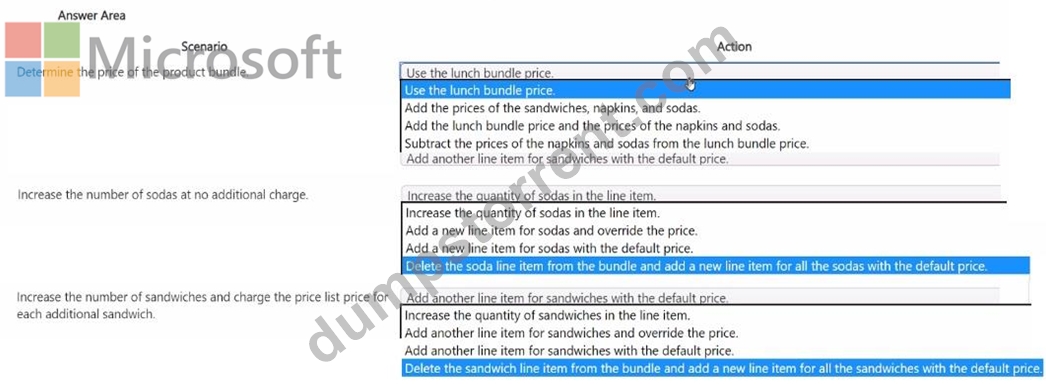
Answer:
Explanation:
Reference:
Increase the Number of Sodas at No Additional Charge: Increase the quantity of sodas in the line item To add sodas without impacting the price, sales staff can simply increase the quantity of sodas in the line item. This approach allows flexibility within the bundle without altering the overall bundle cost, which remains fixed.
Increase the Number of Sandwiches and Charge the Price List Price for Each Additional Sandwich: Add another line item for sandwiches with the default price To charge extra for additional sandwiches, the staff should add another line item for sandwiches. This line item would use the default price from the price list, ensuring that any additional sandwiches beyond the initial bundle are charged accordingly.
This allows the base bundle to remain consistent while additional items are billed separately based on the standard price list.
By following these guidelines, the sales staff can effectively manage the product bundle within opportunities, maintaining pricing consistency while allowing flexibility for additional items as required by the client.
NEW QUESTION # 72
Hotspot Question
You are working a list of leads in Dynamics 365 Sales.
You have a custom security role that contains the following privileges:
- create and edit user-level privileges on the lead and note entities.
- business unit-level append, append to, and assign privileges on the
lead and note entities.
- organization-level share privileges on the lead and note entities.
You need to perform the following actions on leads:
- add notes to leads.
- assign leads to other users.
How should you manage leads? To answer, select the appropriate options in the answer area.
NOTE: Each correct selection is worth one point.
Answer:
Explanation:
Explanation:
Add notes to leads - "Leads owned by you only"
The role has user-level create and edit privileges on the lead and note entities, meaning the user can only create and edit records that they personally own.
Assign leads to other users - "Leads owned by your business unit and its child business units only" The role has business unit-level assign privileges, which allows the user to assign leads within their own business unit and its child business units but not across the entire organization.
NEW QUESTION # 73
A battery manufacturer wants to sell their batteries in boxes of 12 and cases of 24 boxes. You need to set up a unit group so that the manufacturer can sell different quantities. What should you create first?
- A. base unit
- B. related unit
- C. primary unit
Answer: A
Explanation:
* In Dynamics 365 Sales, when setting up a unit group, you must first define the base unit. This is the fundamental unit of measurement for a product and serves as the foundation for defining related units within the group.
* For the battery manufacturer, defining a base unit (such as a single battery) is necessary before configuring related units for boxes of 12 and cases of 24 boxes, as these will be multiples or related units derived from the base unit.
NEW QUESTION # 74
You need to identify the duplicate pet records, so they can be manually merged by the carer. What must you create?
- A. Two duplicate detection jobs and three duplicate detection rules.
- B. One duplicate detection job and three duplicate detection rules.
- C. Two duplicate detection jobs and two duplicate detection rules
- D. Three duplicate detection rules only.
Answer: B
Explanation:
To identify duplicate records, you need to configure both duplicate detection rules and duplicate detection jobs.
Since Terra Flora requires identifying duplicate pet records across various fields, creating three duplicate detection rules is likely necessary to cover different columns (such as name, breed, and dietary requirements) in the Pet table.
One duplicate detection job is sufficient to run these rules concurrently, scanning the database for duplicates across the specified columns. This job can be scheduled or run manually.
Option B is correct as it ensures comprehensive coverage with three rules addressing various fields and one job to manage the duplicate detection process.
Reference from Microsoft Documentation:
For guidance on setting up duplicate detection jobs and rules, refer to Detect duplicate records in Dynamics 365.
NEW QUESTION # 75
......
Microsoft Dynamics 365 Customer Experience Analyst Free Update Certification Sample Questions: https://pass4sure.dumpstorrent.com/MB-280-exam-prep.html